MPC Plugins / Instruments
MPC Plugins Manager
by The Disk King · v1.2.0 · Nov 21, 2026 · 133 downloads
133
Downloads
0
GitHub stars
v1.2.0
Latest version
Nov 21, 2026
Updated
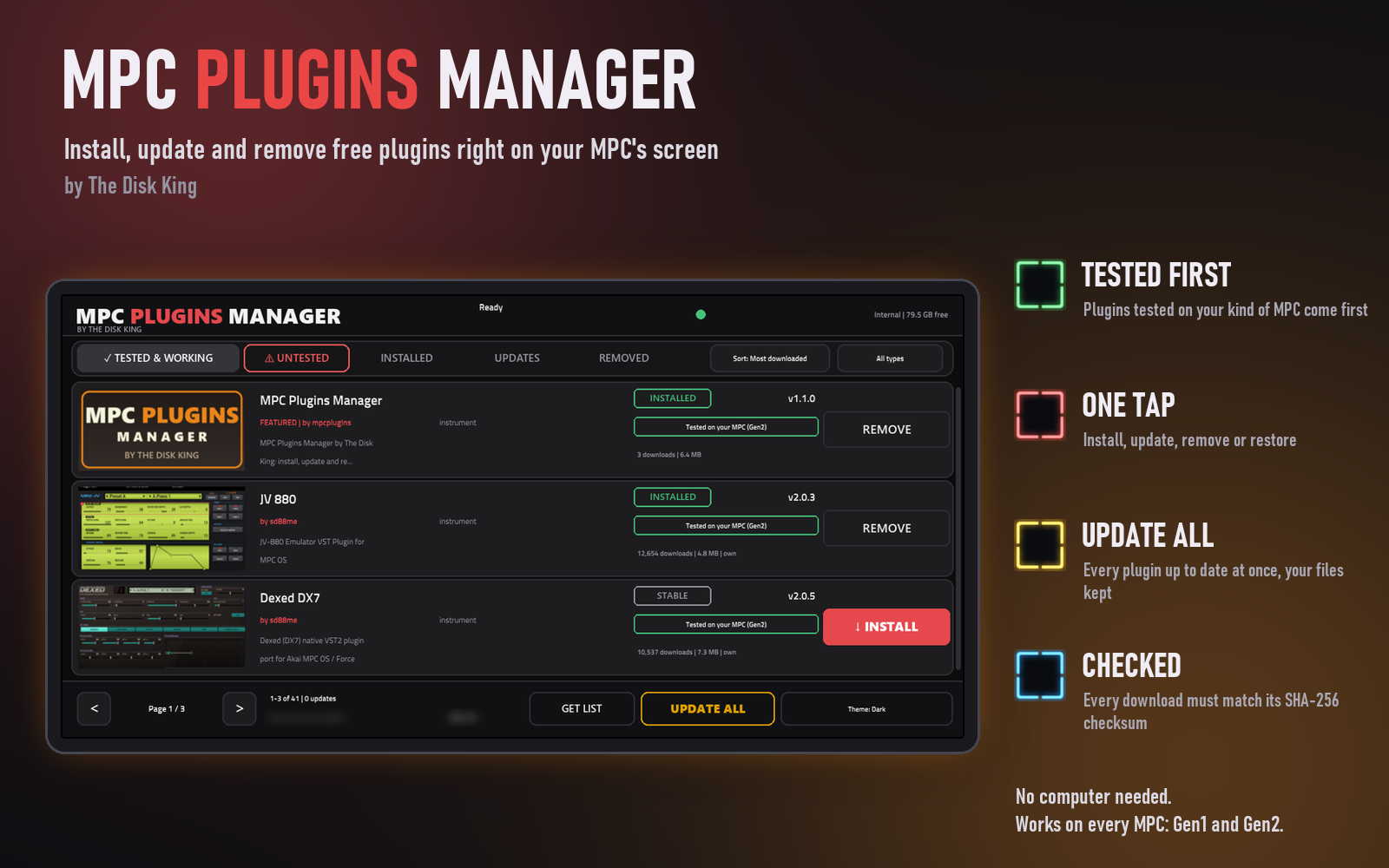
MPC Plugins Manager by The Disk King: install, update and remove free plugins right on your Akai MPC.
Install, update, remove and restore free plugins right on your Akai MPC's screen. No computer needed.
Download v1.2.0
✓ Tested & working
The creator reports testing this exact version on real hardware: MPC Live III (Gen2), MPC OS 3.10.1.12. This is the creator's own report, not a guarantee. Still back up first.
⚑ Safety check: review the notes below
- ✓ Download matches the checksum GitHub lists
- ✓ Built for: Akai SDK
- ✓ Runs on: MPC OS 2.x and 3.x
- ⚑ The plugin runs a small web page on your Wi-Fi (often its phone or browser screen).
- These can be completely normal for what the plugin does, but know them before installing.
- ✓ Nothing risky found in its installer
An automatic look at the files, not a guarantee: it can't see everything a program does. Always back up first.
Disclaimer: use entirely at your own risk
This plugin is made, owned and shared by an independent developer, not by The Disk King, and not by Akai Professional or inMusic. We only list it; the download comes directly from the developer's GitHub. We did not make, test, review or check it for safety and make no promise that it works, is safe, or is free of bugs or harmful code.
Plugins install into your MPC's system and can crash it, corrupt or lose projects and samples, or require reinstalling MPC OS. Save your work and back up your MPC before installing anything.
Everything is provided "as is", with no warranty of any kind. To the fullest extent the law allows, The Disk King is not responsible or liable for any damage, data loss, device failure, lost income or any other harm from downloading, installing or using any plugin listed here. By downloading or installing, you accept all risk and full responsibility. Full disclaimer.
Works on both Gen1 and Gen2: MPC OS 3.10.1 or later (Akai SDK)
MPC-Plugins-Manager-1.2.0-mpc-sdk.zip 6.4 MB
sha256: 8695d2b1bdf4d3714b82b2eeec94c6296c987379e07329e335b9d8d6cb38d16d
Downloads come straight from the creator's GitHub. Check the sha256 matches before installing. New to plugins? How to install plugins on MPC OS 3.10.1.
✓ Easy install on MPC OS 3.10.1: copy one folder
- Works-on-both download: unzip it and copy
The Disk King - VST - MPC Plugins ManagerintoVST2 Pluginson your drive.
Turn on External Plugin Support first. Full step-by-step guide.
Tested working on
- MPC Live III (Gen2), MPC OS 3.10.1.12 (Nov 21, 2026)
Version history
v1.2.0 Nov 21, 2026 · 66 downloads
- **Gen1 owners see more plugins in the main list.** A plugin tested on Gen2 that comes as one download for every MPC (made with the MPC Plugin SDK) is now shown with the tested plugins on a Gen1 too, marked "Tested on Gen2, built for Gen1", instead of on the red Untested tab. The same the other way round. Installing it still asks for a second tap. **Install:** download `MPC-Plugins-Manager-1.2.0-mpc-sdk.zip`, unzip it, copy the folder `The Disk King - VST - MPC Plugins Manager` into `VST2 Plugins` on your MPC, restart, add a Plugin track and pick External Plugins > The Disk King > MPC Plugins Manager, then tap the arrow next to its name. Needs MPC OS 3.10.1 with Enable Enhancements and External Plugin Support on. Full guide: https://thediskking.com/plugins/install/ Provided as is: The Disk King is not responsible in any way for any damage or loss. Back up first.
v1.1.0 Nov 19, 2026 · 55 downloads
**Bigger, clearer, and a details page for every plugin.** - **Big cards:** 3 large cards at a time, each with a big screenshot, a 2-line description, downloads and size, badge, version, tested chip and the action button. - **Roll your finger to scroll.** Pages of 20 plugins; drag over the cards to move through the page, and use the arrows for the next or previous 20. Q-Link 1 scrolls too. - **Details page:** tap a plugin's picture for its full page: big screenshot, description, what's new in the latest version, version history with dates and downloads, what it needs, and the install button always on the page. BACK returns to the list. - **Every plugin has its own picture** (or a clean name tile), so plugins from the same maker no longer look alike. Plugins with real pictures come first. - **Themes change live.** Tap THEME and the whole screen switches at once, no restart. Your theme is remembered. - **Featured:** The Disk King's hand-picked plugins come first, marked FEATURED. - **UPDATE only shows for newer versions** (it no longer offers to go back to an older one). - Texts fit the MPC's screen limits, and the Q-Link box no longer covers the list. - Fixed a blank screen caused by a picture setting. **Install:** download `MPC-Plugins-Manager-1.1.0-mpc-sdk.zip`, unzip it, copy the folder `The Disk King - VST - MPC Plugins Manager` into `VST2 Plugins` on your MPC, restart, add a Plugin track and pick External Plugins > The Disk King > MPC Plugins Manager, then tap the arrow next to its name. Needs MPC OS 3.10.1 with Enable Enhancements and External Plugin Support on. Full guide: https://thediskking.com/plugins/install/ Provided as is: The Disk King is not responsible in any way for any damage or loss. Back up first.
v1.0.0 Nov 19, 2026 · 12 downloads
First release. Tested on an MPC Live III with MPC OS 3.10.1. - Browse every free plugin on the MPC's own screen: Tested & Working, Untested, Installed, Updates and Removed tabs, 5 cards per page with screenshots, badges and versions. - "Tested" means tested on your kind of MPC (Gen1 or Gen2), not just tested somewhere. - One button per plugin: INSTALL, UPDATE, REMOVE, RESTORE. UPDATE ALL in one tap. - Untested installs, REMOVE and UPDATE ALL ask for a second tap. - Downloads over HTTPS only, checked against their SHA-256 checksum before anything is copied. - Updates keep your own files (ROMs, presets, patterns); the old version is saved in Removed Plugins. - Writes the `plugin.json` MPC OS 3.10.1 needs for releases that only carry the older `mpc-plugin.json`. - Sort (most downloaded, newest, A to Z) and type filter (instruments, effects, addins). - 10 color themes, Disk King by default. A new theme shows after the next MPC restart. - Optional phone page on the same Wi-Fi, protected by a 4-digit PIN; 5 wrong PINs lock it for a minute. - Starts its work only when it is on a track, never while the MPC scans plugins. **Install:** download `MPC-Plugins-Manager-1.0.0-mpc-sdk.zip`, unzip it, copy the folder `The Disk King - VST - MPC Plugins Manager` into `VST2 Plugins` on your MPC, restart, add a Plugin track and pick External Plugins > The Disk King > MPC Plugins Manager, then tap the arrow next to its name. Needs MPC OS 3.10.1 with Enable Enhancements and External Plugin Support on. Full guide: https://thediskking.com/plugins/install/ Provided as is: The Disk King is not responsible in any way for any damage or loss. Back up first.
To improve this listing
- explain the flagged behavior (network, running programs, installer commands) in the README
Made this plugin? Add our badge to your README
 Paste this into your README. It updates itself when your plugin gets the Tested & Working badge.
[](https://thediskking.com/plugins/mpc-plugins-manager/)